The scoot desktop
The primary path. Instead of hand-wiring the compositor, the bar, the wallpaper daemon, the lock policy and the keymap from separate pages, enable the desktop profile and pick a look:
# Home configuration:programs.scoot.desktop = { enable = true; look = "music-desk"; # "vinyl-sunset" | "radial-burst" | "moonrise" | null (no theming)};# System configuration:programs.scoot.desktop = { enable = true; # Greeter passthrough (opt-in login screen, default off): # greeter.enable = true;};enable turns on the session wiring and the bar plus wallpaper defaults:
on the NixOS side the login-screen session entry (session.enable) and
the system-wide scootbg (wallpaper.enable, so a [wallpaper] section
finds it on PATH); on the home-manager side the portal config
(portals.enable); on either side the bar (programs.scootbar.enable,
but only when that module is imported — the profile never requires it).
Either side alone degrades to what it can do: NixOS without
home-manager gets the entry and the packages but no themed config file
(the compositor config is per-user), and home-manager without NixOS gets
the themed files and the user units but no login-screen entry.
Set up the flake
Section titled “Set up the flake”Copy-paste complete, starting from nothing. Add the input:
{ inputs = { nixpkgs.url = "github:NixOS/nixpkgs/nixos-unstable"; scoot.url = "github:scoot-sh/scoot"; };}Prefer FlakeHub? The flake is published as scoot-sh/scoot (once per
merge to main, after both architectures’ binaries reach Cachix):
{ inputs = { nixpkgs.url = "github:NixOS/nixpkgs/nixos-unstable"; scoot.url = "https://flakehub.com/f/scoot-sh/scoot/0.1.*.tar.gz"; };}or fh add scoot-sh/scoot. 0.1.* follows the rolling release (every
merge to main); pin a full version from the flake’s page to hold
still. Either way, set up the binary cache
or Nix compiles Smithay and the crates locally.
About scoot.inputs.nixpkgs.follows = "nixpkgs": leave it off
unless you have a reason. The flake pins its own nixpkgs revision, and
Cachix holds binaries built from exactly that revision — with follows
pointing scoot’s inputs at your nixpkgs instead, every store path
differs, the cache misses, and you compile locally the first time
(minutes). Turn follows on only to unify the tree with your system
at that cost. Which package name to take, the overlay, nix run, the
macOS split and the old-flexwm renames are under Packaging
notes.
A complete minimal setup — flake plus system config:
{  inputs = {    nixpkgs.url = "github:NixOS/nixpkgs/nixos-unstable";    scoot.url = "github:scoot-sh/scoot";  };
outputs = { nixpkgs, scoot, ... }@inputs: { nixosConfigurations.myhost = nixpkgs.lib.nixosSystem { system = "x86_64-linux"; specialArgs = { inherit inputs; }; modules = [ ./configuration.nix scoot.nixosModules.scoot ]; }; };}{ inputs, pkgs, ... }:{ programs.scoot = { enable = true; desktop.enable = true; desktop.look = "moonrise"; # Real hardware with a GPU? Take the scanout build instead of the default: # (see "Which build do I need" on the install page) # package = inputs.scoot.packages.${pkgs.system}.scoot-gpu; # Log in through ReGreet (opt-in; default off): # greeter.enable = true; };}nixos-rebuild switch --flake .#myhostThe session entry comes on with the profile (without it, session.enable
stays an explicit opt-in — a login-screen change is a change to your way
back in, and that stays deliberate). The entry adds scoot alongside
your existing sessions, never replacing the default. The greeter replaces
the login screen, so it is opt-in twice over; it is refused at eval
beside GDM or SDDM. Logging in through it starts the same session First
session describes.
Which options live on which side:
| Side | Owns |
|---|---|
NixOS (programs.scoot in configuration.nix) |
the package system-wide; the login-screen session entry; system-wide scootbg (so [wallpaper] finds it on PATH); the idle/lock tools system-wide, the docked-lid rule, and the locker’s PAM service; the greeter |
Home Manager (programs.scoot in the home config) |
the themed config file; the portal config; the user units (idle policy, notification daemon, bar feed); the tools for the user |
Home Manager
Section titled “Home Manager”Standalone (a home.nix kept next to the machine that edits it — this
form also manages the config on macOS, for the Linux box it deploys
to):
{  inputs = {    nixpkgs.url = "github:NixOS/nixpkgs/nixos-unstable";    home-manager.url = "github:nix-community/home-manager";    home-manager.inputs.nixpkgs.follows = "nixpkgs";    scoot.url = "github:scoot-sh/scoot";  };
outputs = { nixpkgs, home-manager, scoot, ... }: { homeConfigurations."alice" = home-manager.lib.homeManagerConfiguration { pkgs = nixpkgs.legacyPackages."x86_64-linux"; modules = [ ./home.nix scoot.homeModules.scoot ]; }; };}{ programs.scoot = { enable = true; desktop.enable = true; desktop.look = "moonrise"; };}(The legacy spelling scoot.homeManagerModules.scoot resolves to the
same module.) As a NixOS module instead — home-manager inline in the
system flake above:
# inside outputs, beside ./configuration.nix:# modules = [# scoot.nixosModules.scoot# home-manager.nixosModules.home-manager# ];# home-manager.users.alice.imports = [ scoot.homeModules.scoot ];# home-manager.users.alice.programs.scoot = {# enable = true;# desktop.enable = true;# desktop.look = "moonrise";# };A home-manager-only setup still needs two things from wherever PAM and the seat are configured: the locker’s PAM service (else no password unlocks it), and backlight rights for dimming (else the dim step logs EPERM and does nothing).
Without flakes
Section titled “Without flakes”nix run github:scoot-sh/scoot -- --nested -- foot tries it with
nothing installed, and nix profile add keeps it (see
Install). Not on NixOS at all? That is the
second front door: the same page’s build-from-source
route plus your own bar, launcher and session script — the profile is
optional by design, and everything it automates is documented piece by
piece across this site.
Which build sits underneath is still your call: the profile never sets
programs.scoot.package, so pick the CPU or GPU build
there and the whole desktop follows it.
Two loud refusals instead of silent no-ops: desktop.enable without
programs.scoot.enable, and a look without desktop.enable, each fail
evaluation naming the missing switch; an unknown look fails naming the
four valid ones.
Pick a look
Section titled “Pick a look”look applies that example’s palette to every piece the flake owns
today: the compositor [appearance] colors, the bar colors, and the
session wallpaper where one ships in the repository:
| Look | Compositor ring / background | Bar | Wallpaper |
|---|---|---|---|
music-desk |
blue ring #3D579A, paper #FCFBFB |
paper, ink and blue | ships (copied to the store) |
radial-burst |
blue ring #31a9e5, plum #241721 |
plum, yellow and blue | ships (copied to the store) |
moonrise |
amber ring #FF9A49, slate navy #2B3648 |
navy, cream and amber | ships (copied to the store) |
vinyl-sunset |
orange ring #E59560, espresso #271A1F |
espresso, cream and orange | no image ships: the illustration’s license forbids passing it on standalone, so the session shows the flat espresso background_color unless you set wallpaper yourself |
null (the default) themes nothing. What the look does not theme yet
stays yours: layout details (gaps, corner radius, column widths — copy
them from the example’s scoot.toml if you want the whole look), the
terminal palette (the flake installs no terminal), and the login screen’s
stylesheet (each example ships a regreet.css; the greeter child themes
it later).
Precedence, highest first, per key: a value you set in settings,
then Stylix’s (Stylix stays the override path where present), then the
look’s. So settings.appearance.background_color = "#123456" beside
look = "music-desk" replaces that one color and keeps the rest of the
look. One combination is invalid the same way the Stylix one is: a
wallpaper.color you set yourself beside a look’s shipped image (the
two together are refused by scoot, fail-safe — the session carries on
with background_color). Set your own image instead (it wins per key),
or drop to look = null.
For vinyl-sunset, the illustration is yours to download: point the
wallpaper at your copy and the flat color steps aside:
programs.scoot.settings.wallpaper = { image = "~/Pictures/wallpapers/vinyl-sunset.png"; mode = "fill";};The look does not fetch it for you, deliberately: the illustration’s
license forbids passing it on standalone and automated downloading is at
best unclear under its terms, so no URL is wired into the look. To drop
the illustration entirely, remove the [wallpaper] table: the flat
espresso background_color is the look without it. Every look is
previewed in Theming — including how to make your
own.
Idle and lock
Section titled “Idle and lock”Idle and lock come on with the profile: a laptop that never dims, locks, or sleeps its panels is not daily-drivable, so this is a default, not a slot you wire yourself. After this many seconds without input:
| At | What | Why this step |
|---|---|---|
| 2 min | the panel dims to 10% (brightnessctl -s set 10%, restored on activity) |
the backlight is most of idle draw (measured on the M2: 4.55 W screens on, 1.52 W both off) |
| 4 min | the session locks (loginctl lock-session, locker over ext-session-lock-v1) |
after dim, before screens off, so the lock is already up when the panel goes dark and no unlocked frame is ever visible on wake |
| 5 min | every output powers off (wlopm --off '*', back on at the first input, locked or not) |
the measured 3 W saving |
| sleep | locks first, then sleeps (swayidle’s before-sleep, waited on) |
suspend must never land on an unlocked session |
| docked lid close | locks, does not suspend | a closed lid on a multi-output box means the user walked away, not that the session should die |
Audio holds the whole sequence off while anything plays (any sink or source running), so music or a call never dims the panel. Any input restarts every timer from zero, so there is nothing to reset after unlock. One timeout set covers AC and battery alike; per-machine tuning is an override away.
The locker follows the look: screen and indicator from its palette (a
value in lock.settings winning per key, theme.targets.lock.enable = false dropping the themed block while the rest follows the look).
Locked, it looks like this — the music-desk palette, paper screen, the
indicator hidden until you type (captured from a real session through
scoot’s own IPC screenshot path):

Every value is an option, applied on rebuild/switch (the units restart into the new config; no re-login):
| Option | Type | Default | Meaning |
|---|---|---|---|
desktop.idle.enable |
bool | true with the profile |
run the policy (dim, screens off, sleep lock, audio hold) |
desktop.idle.dimTimeout |
int (seconds) | 120 |
inactivity before dimming; 0 disables the step |
desktop.idle.dimLevel |
int (percent, 1-100) | 10 |
brightness the dim step sets |
desktop.idle.lockTimeout |
int (seconds) | 240 |
inactivity before locking; 0 disables the step (sleep still locks) |
desktop.idle.offTimeout |
int (seconds) | 300 |
inactivity before outputs power off; 0 disables the step |
desktop.idle.mediaInhibit.enable |
bool | true with the profile |
hold idle while audio plays (needs PipeWire or PulseAudio running) |
desktop.idle.lock.enable |
bool | true with the profile |
lock through the locker below |
desktop.idle.lock.command |
string | loginctl lock-session (system path on NixOS) |
the stable lock action: what the timeout runs, and what the keymap’s Super+Escape bind runs — lid-close and manual locks share this path through logind |
desktop.idle.lock.daemon |
enum ("swaylock") |
"swaylock" |
the locker behind the action (a future scootlock widens this without renaming anything) |
desktop.idle.lock.settings |
attrset of string | { } |
extra swaylock lines over the themed ones (a value here wins per key) |
desktop.theme.targets.lock.enable |
bool | true |
theme the locker from the look; false keeps swaylock’s own style while the rest follows the look |
programs.scoot.desktop = { enable = true; # Later to bed: lock at 10 min, screens off at 15. idle.lockTimeout = 600; idle.offTimeout = 900; # No idle policy at all (the profile turns the set on; each switch below # turns its piece back off): # idle.enable = false; # idle.lock.enable = false; # idle.mediaInhibit.enable = false;};Troubleshooting, by symptom:
- Screens never dim or power off. Check the unit is running:
systemctl --user status scoot-idle— and that it started with the display (a hand-started session must reachgraphical-session.targetwithWAYLAND_DISPLAYimported). The generated config is at~/.config/swayidle/config: read it, the timeouts are literal. Dim specifically needs the seat: logind grants the active login backlight access, so dim works in the seat session and logs EPERM anywhere else (over ssh, from a timer with no session). - The locker appears but no password works. Unlock needs PAM: the NixOS side names it itself, but a home-manager-only setup needs it set wherever PAM is configured. Check Caps Lock second — the indicator shows its state while you type.
- The timeout passes and the session never locks. The locker is
probably exiting immediately: run
swaylock -f -C ~/.config/swaylock/configby hand — if it drops straight back to the prompt, its error names the cause. loginctl lock-sessiondoes nothing visible. Something must listen for logind’s Lock: that is the policy’slockevent, soscoot-idleis not running orlock.enableis off.- Music dims the panel. The hold needs the inhibitor unit and an
audio server:
systemctl --user status scoot-audio-inhibitplus something actually playing. Without a server the unit backs off and stays stopped. - Closing the docked lid suspends. Something beat the profile’s docked-lid lock rule: your own logind setting wins over it.
Without the flake, the same policy is a hand-written swayidle setup — see Idle in the compositor reference.
Notifications
Section titled “Notifications”Notifications come on with the profile: a desktop with no notification
daemon drops password prompts, calendar pings and low-battery warnings
on the floor. The daemon is mako, owning
org.freedesktop.Notifications on the session bus as a user unit, with
its popups on the overlay layer:
programs.scoot.desktop = { enable = true; # A popup at the bottom-right, at most three visible: # notifications.settings = { anchor = "bottom-right"; max-visible = "3"; }; # No daemon at all on this box: # notifications.enable = false;};The one setting that matters most is already set: layer=overlay.
mako’s own default is top, which the compositor hides under a
fullscreen window — so a fullscreen game would swallow every popup.
overlay stays above it (the frame then composites instead of scanning
out directly; nothing changes on screen, at the cost of one compositing
pass). A critical popup over a fullscreen window looks like this (blue
ring for normal, urgent ring for critical — captured from a real session
through scoot’s own IPC screenshot path):
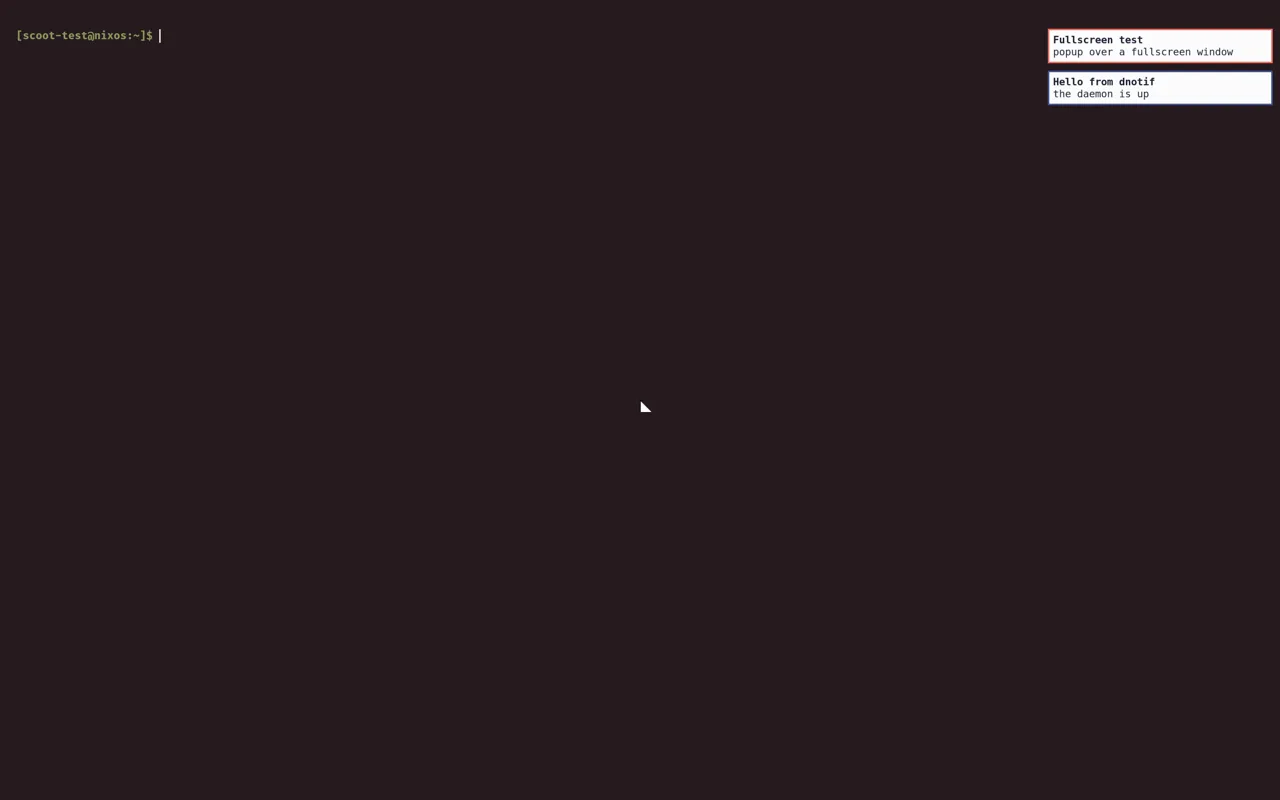
Overriding layer back to top re-hides popups under fullscreen.
Over the session lock, nothing of a notification’s content ever shows: while locked the compositor draws nothing but the lock client’s own surfaces, so popups that arrive while locked wait in the daemon and appear on unlock. The shot below is intentionally blank — it is byte-identical to the frame just before the notification arrived, which is the whole proof:

DND state and the unread count reach the bar through its push module —
the module is defined, not placed; show it with one line in your bar
config:
right = ["notifications", "clock"]Every value is an option, applied on rebuild/switch (the units restart into the new config; no re-login):
| Option | Type | Default | Meaning |
|---|---|---|---|
desktop.notifications.enable |
bool | true with the profile |
run mako plus the bar feed |
desktop.notifications.daemon |
enum ("mako") |
"mako" |
the daemon behind enable (a future scootnotify widens this without renaming anything) |
desktop.notifications.settings |
attrset of string | { } |
extra mako lines over the generated ones (a value here wins per key, rendered verbatim) |
desktop.theme.targets.notifications.enable |
bool | true |
theme mako from the look; false keeps mako’s own style while the rest follows the look |
Troubleshooting, by symptom:
- No popups at all. Check the unit:
systemctl --user status mako— and that D-Bus knows it:busctl --user list | grep -F Notificationsshould name mako’s owner. - Popups vanish under fullscreen. Something set
layerback totop: read~/.config/mako/config(the generated file), the first content line is the layer. - The bar shows nothing. The module needs placing (the one line
above), the bar needs the
pushfeature, and the feed needs running:systemctl --user status scoot-notify-sync. - DND is stuck on.
makoctl modelists the modes; toggle it back:makoctl mode -r do-not-disturb. - A popup stayed up for hours. That is mako’s default (no timeout):
makoctl dismiss -aclears them all into history, or set one:notifications.settings.default-timeout = "10000";(milliseconds). - Two daemons fight over popups. Another notifier owns the bus name instead: only one can. Turn this one off or uninstall the other.
Clipboard
Section titled “Clipboard”Copy in one window, close it, and the paste still works: every copy lands in a history kept by cliphist, restorable with one keypress. Without this slot, a copy dies with the app that offered it — from your side of the screen that reads as data loss, and agents move text through the clipboard constantly, so the profile turns it on.
programs.scoot.desktop = { enable = true; # A longer tail in a moved db: # clipboard.maxItems = 250; # clipboard.dbPath = "/home/you/.cache/cliphist-test/db"; # No history at all on this box (each switch below is its own): # clipboard.enable = false;};What runs: two watcher units (regular clipboard and primary selection,
wanted by graphical-session.target), each a wl-paste --watch
feeding one shared history, plus wl-copy/wl-paste on PATH for
scripts and terminals. The history keeps 100 entries by default
(oldest dropped first, each entry at most 5 MB), byte-for-byte:
trailing newlines survive, and so do images. Press Super+v and the
picker shows the newest first; Enter restores the picked entry to the
clipboard, then paste as usual:
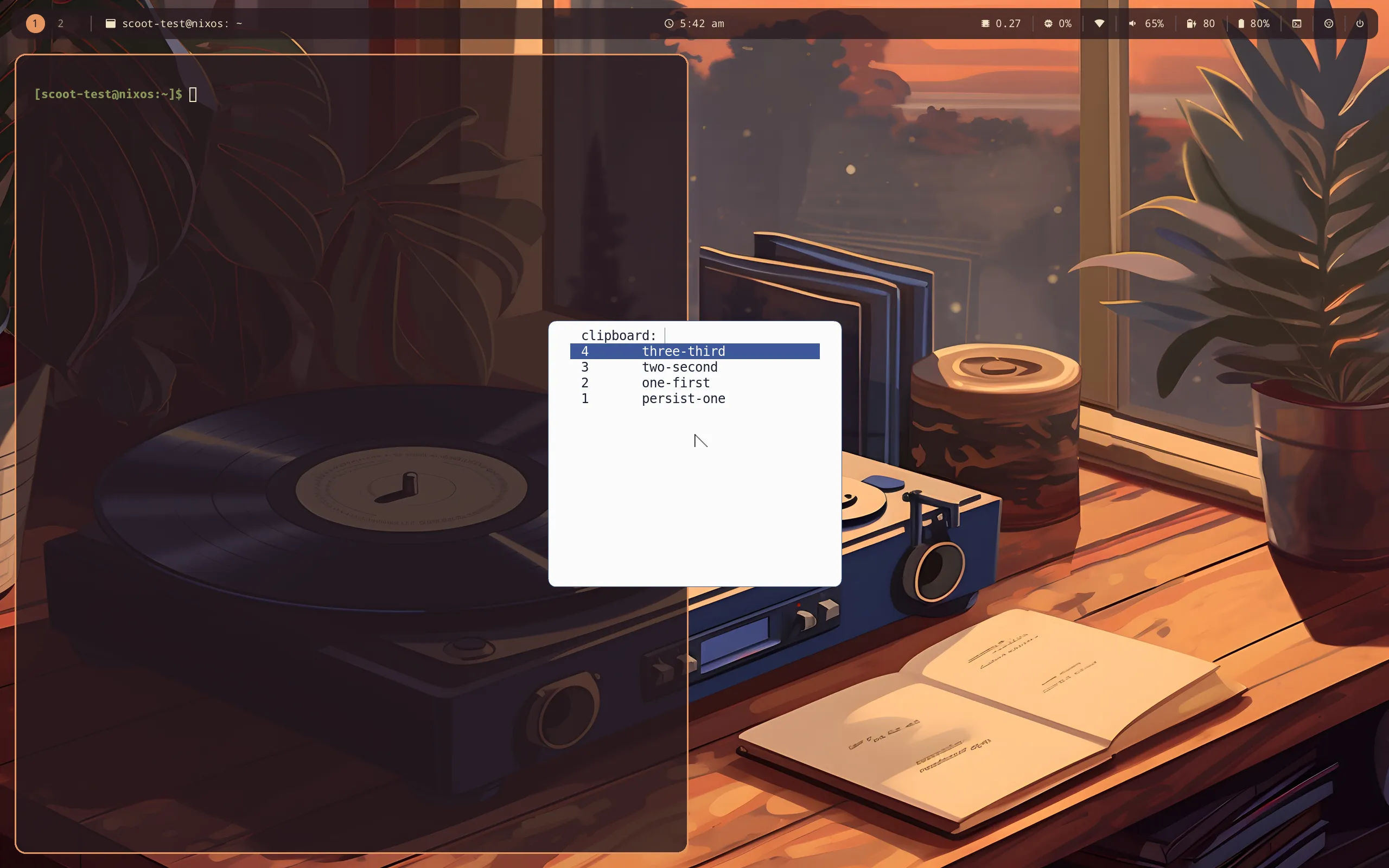
Know exactly what “the paste still works” promises, because Wayland
selections are owner-held: the history survives the source app
closing (and a reboot — it lives in a db on disk), while the live
selection still dies with its owner. So Ctrl+v right after closing
the source finds nothing — open the picker, Enter, paste. One
keypress, always the same path.
Password-manager copies never land in history, by construction: such
an offer carries the x-kde-passwordManagerHint MIME type, for which
the watcher stores nothing. Managers that do not set the hint are
not excluded — treat the history as sensitive-adjacent anyway. Try
it: wl-copy --sensitive copies, and the history stays empty.
Over the session lock, two halves: the history is wiped as the session
locks (pre-lock copies never sit on disk behind the lock screen), and
nothing copied during the lock is recorded. Without the idle policy
there is no lock event to ride, so a standalone clipboard wipes
manually (cliphist wipe). The db lives at cliphist’s default
(~/.cache/cliphist/db, honoring XDG_CACHE_HOME) unless dbPath
moves it — on disk, so history survives reboots. That is the privacy
trade-off, stated whole: convenience against exposure (any same-uid
process reads the db file). Secrets never land there by the mechanism
above, the lock wipes it every lock, and wipe empties it any time;
there is deliberately no encrypt-at-rest.
Every value is an option, applied on rebuild/switch (the units restart into the new config; no re-login):
| Option | Type | Default | Meaning |
|---|---|---|---|
desktop.clipboard.enable |
bool | true with the profile |
keep history (two watcher units), wl-copy/wl-paste on PATH, the picker bind |
desktop.clipboard.maxItems |
int (at least 1) | 100 |
history entries kept, oldest dropped first |
desktop.clipboard.dbPath |
string or null | null (cliphist’s default) |
history db path: absolute, letters, digits and ._/+@- only; anything else fails evaluation |
desktop.theme.targets.clipboard.enable |
bool | true |
theme the picker from the look; false keeps fuzzel’s own style |
Troubleshooting, by symptom:
- Close the app and the paste is empty. That is the live selection,
not the history: open the picker (
Super+v), Enter on the entry, paste. If the picker is empty too, the watcher never stored it:systemctl --user status scoot-clipboard-store(and-primary-store), thencliphist list. Super+vopens nothing. The slot renders that bind only withclipboard.enablebeside the keymap (both on with the profile). Then check the menu:fuzzel --dmenufrom a terminal — with an empty history it exits at once, which is the picker staying quiet, not an error.- Escape clears my clipboard. It does not: a cancelled pick exits
before
wl-copyruns. If the selection changed anyway, another manager runs beside this one — only one watcher per selection should run. - A password is in the history. The offering app did not set the
hint: delete it (
cliphist list | fuzzel --dmenu | cliphist delete, orwipefor all of it) and tell the app to set it. - Copies made while locked are in the history. The store entry’s
probe failed open: check
scoot-clipboard-storeand the compositor’s socket. The wipe still ran at lock, so pre-lock entries are gone regardless. - Two pickers / two histories. Another manager runs beside this one: only one should. Turn this one off or uninstall the other.
Hardware keys and desktop actions
Section titled “Hardware keys and desktop actions”A laptop whose brightness and volume keys do nothing is not daily-drivable, so the profile ships one keymap for them and for the desktop actions — and it is on with the profile. The compositor’s own built-in defaults stay window management only: hardware binds spawn tools scoot does not ship, so they belong to the profile that installs those tools, not to every scoot session.
| Press | Does | Needs (beside the profile) |
|---|---|---|
XF86MonBrightnessUp / Down |
panel +5% / -5% |
brightnessctl (installed) |
XF86AudioRaiseVolume / LowerVolume |
default sink +5% / -5% |
PipeWire running |
XF86AudioMute |
default sink mute toggle | PipeWire running |
XF86AudioMicMute |
default source mute toggle | PipeWire running |
XF86AudioPlay / Pause / Stop / Next / Prev |
play-pause / pause / stop / next / previous | a player speaking MPRIS |
Super+Escape |
lock (through logind) | the locker |
Super+d |
launcher | launcher.enable (stub today — binds nothing yet) |
Super+v |
clipboard picker | clipboard.enable |
Super+n |
dismiss visible notifications | notifications.enable |
Super+Shift+n |
do-not-disturb toggle | notifications.enable |
Super+Ctrl+n |
show hidden notifications | notifications.enable |
Print |
screenshot every output into ~/Pictures |
capture.enable (stub today) |
Shift+Print |
screenshot a picked region into ~/Pictures |
capture.enable (stub today) |
On an Apple keyboard these are the Fn row: F1/F2 brightness,
F7/F8/F9 previous/play/next, F10 mute, F11/F12 volume
down/up. There is deliberately no on-screen display yet: volume and
brightness step silently until the audio-OSD child wires one. Every
hardware keysym and every Super combo above was checked against the
compositor defaults — no overlap, including Super+Shift+e (quit) and
Super+Space (float focus).
Every value is an option, applied on rebuild/switch plus a session
reload (scootctl reload) or re-login:
| Option | Type | Default | Meaning |
|---|---|---|---|
desktop.keys.enable |
bool | true with the profile |
render the keymap into [binds] |
desktop.keys.binds.<name>.enable |
bool | true |
bind that key (brightnessUp, brightnessDown, volumeUp, volumeDown, volumeMute, micMute, mediaPlay, mediaPause, mediaStop, mediaNext, mediaPrev, lock, launcher, clipboard, notifDismiss, notifDnd, notifHistory, captureOutput, captureRegion); false leaves its combo unbound |
Each bind renders as a default a value you set in settings.binds wins
over — override or remove one bind like this:
programs.scoot.desktop.keys.binds.volumeUp.enable = false;programs.scoot.settings.binds."XF86AudioRaiseVolume" = "spawn wpctl set-volume @DEFAULT_AUDIO_SINK@ 3%+";Overriding with a plain string like that drops the bind’s repeat and lock-screen behavior (a string carries no flags). To keep both, override with the table form:
programs.scoot.settings.binds."XF86AudioRaiseVolume" = { action = "spawn wpctl set-volume @DEFAULT_AUDIO_SINK@ 3%+"; repeat = true; allow_when_locked = true;};A bind whose tool is missing fails quietly — scoot logs a warning and carries on, input never wedges — so a partial setup degrades to dead keys, never to a broken session.
Troubleshooting, by symptom:
- A Fn key does nothing. Check the tool first, not the bind:
brightnessctl get,wpctl get-volume @DEFAULT_AUDIO_SINK@,playerctl status. Then check the bind reached the file ([binds]in~/.config/scoot/config.toml, after a reload). Then check scoot saw the key:scoot msg key XF86AudioRaiseVolumeshould do what the key does — if it does, the compositor never received the keystroke. - Volume or brightness keys die at the lock screen. They should not:
those binds fire while locked by default. If yours do not, the bind
lost its flags — overriding one with a plain string drops
allow_when_locked, and removing it throughbinds.<name>.enable = falseleaves the combo unbound entirely. Check the rendered[binds]in~/.config/scoot/config.toml: a working volume bind is a table withallow_when_locked = true. - Holding volume up steps once. It should keep stepping at 25 Hz
after a 200 ms delay. A bind that fires once per press lost its
repeatflag the same way: a plain-string override, which the rendered[binds]shows as a bare string instead of a table withrepeat = true. (Overriding with a plain string drops both flags; to keep them, override with the table form — action plus flags. See the bind grammar.) Super+dopens nothing. The launcher slot is still a stub, and so is capture — whileSuper+vworks today (the clipboard picker, above) and so does theSuper+nfamily (mako’s own commands) whenever its slot is on beside the keymap.
Wallpaper from a link
Section titled “Wallpaper from a link”The session wallpaper (scootbg) can be a link:
point set — or scoot’s [wallpaper] image — at an http(s) URL and
the daemon downloads it once, caches it under ~/.cache/scootbg/, and
shows it like any other image. Pin it with sha256 so a changed byte
fails loudly instead of landing on screen:
programs.scoot.settings.wallpaper = { image = "https://example.com/hills.jpg"; sha256 = "9f86d081884c7d659a2feaa0c55ad015a3bf4f1b2b0b822cd15d6c15b0f00a08"; mode = "fill";};Until the download lands — and when it fails — the compositor’s background shows and the error says why; nothing blocks and nothing retries in a loop. Full detail (cache layout, the retry rules, every failure mode) is in Wallpaper from a link.
The greeter
Section titled “The greeter”Passthrough, not profiled.
programs.scoot.desktop.greeter is programs.scoot.greeter under the
profile’s name (same options, same assertions, same forced session
entry). In particular desktop.enable never touches the login screen:
no default session, no autologin, nothing that could strand a login —
the greeter stays an explicit opt-in on top of the profile. Logging in
through it starts the same session First session
describes.
XWayland, and what comes next
Section titled “XWayland, and what comes next”XWayland is a knob plus your existing package choice: the profile’s
desktop.xwayland.enable defaults the compositor’s [xwayland] enabled
on, and you point programs.scoot.package at the XWayland build as in
the install page. With the
default package the knob warns and the session runs Wayland-only.
Every later piece has its slot already, off and inert: one boolean (plus a package override where a package is involved) per paved-path child, so those children fill bodies without renaming options:
| Slot | Type | Default | Child |
|---|---|---|---|
desktop.launcher.enable |
bool + package | false |
launcher (fuzzel) |
desktop.capture.enable |
bool + package | false |
screenshots bound to keys (grim + slurp) |
desktop.auth.enable / desktop.secrets.enable |
bool + package | false |
polkit agent + keyring |
desktop.audio.enable |
bool + package | false |
audio baseline and OSD |
desktop.clipboard.enable (+ maxItems, dbPath, three packages) |
bool (+ int, path, packages) | true (Clipboard: history kept, picker bound, wiped at lock) |
clipboard persistence + history (lean cliphist + wl-clipboard + fuzzel) |
desktop.nightlight.enable |
bool + package | false |
night light |
desktop.power.enable |
bool + package | false |
power profiles, suspend, charge limit |
desktop.theme.enable |
bool + package | false |
GTK/Qt theme, dark mode |
desktop.apps.terminal.enable / desktop.apps.fileManager.enable |
bool + package | false |
terminal + file manager |
desktop.displays.enable |
bool | false |
output policy |
desktop.inputMethod.enable |
bool | false |
input-method wiring |
desktop.automount.enable |
bool + package | false |
removable-media automount |
Enabling one today is accepted and does nothing yet — except where the keymap above says otherwise (a slot the keymap gates a bind on: enabling it beside the keymap binds that key). Changes apply on rebuild/switch.