
Notifications
Notifications come on with the profile. The daemon is scootnotify,
owning org. on the session bus as a user
unit, with its popups on the overlay layer:
programs.scoot.desktop = { enable = true; # No daemon at all on this box: # notifications.enable = false;};Popups use layer=overlay, so they stay above fullscreen windows
(the frame then composites instead of scanning out directly, at the
cost of one compositing pass). A critical popup over a fullscreen
window looks like this (blue ring for normal, urgent ring for
critical):
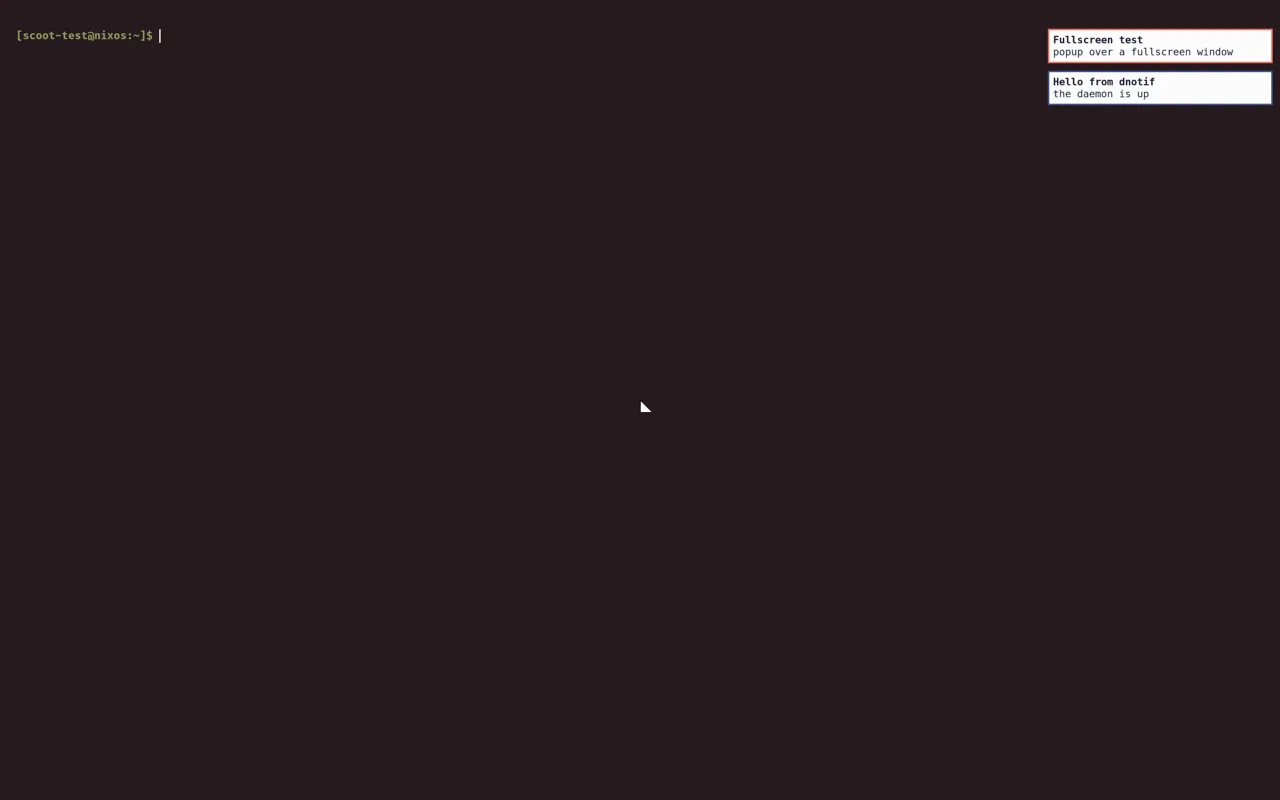
Overriding anchor moves the stack corner; the layer stays
overlay (scootnotify has no layer knob).
Over the session lock, nothing of a notification’s content ever shows: while locked the compositor draws nothing but the lock client’s own surfaces, so popups that arrive while locked wait in the daemon and appear on unlock. The shot below shows only the lock screen; it is byte-identical to the frame just before the notification arrived:

DND state and the unread count reach the bar through its push module.
The module is defined but not placed; show it with one line in your bar
config:
right = ["notifications", "clock"]Each state has its own icon: a hollow circle while idle, a solid dot beside the unread count, and a crescent moon while do-not-disturb holds notifications (DejaVu Sans at 17 px):



The defaults are all in DejaVu Sans, the bar’s default font, so they
render with no symbol font. Each icon is overridable. An empty unread
or dnd sends no icon, so the static idle icon shows beside the text
(empty idle too for none). Each is empty or one glyph: two or more
glyphs fail evaluation, since the bar refuses them per update (two
2-byte glyphs such as éé slip past the check and leave that state’s
last value shown, so do not use them). A Nerd Font glyph works wherever
bar. provides one:
programs.scoot.desktop.notifications.bar.icons = { idle = "○"; # the push module's static icon; "" shows nothing while idle unread = "●"; # sent beside the count, overriding idle while set dnd = "☾"; # sent while do-not-disturb is on, overriding idle while set};A future daemon keeps these option names. scootnotify pushes DND and
the unread count to the push module itself, with no feed script beside it, and the bar’s click runs
scootnotify msg dnd toggle:
programs.scoot.desktop.notifications.daemon = "scootnotify"; # the default; drop the lineThere is no mako package, no mako config and no feed script, the
three binds sit on scootnotify msg, and
programs. holds the daemon’s own file (see
scootnotify). To go back, set daemon = "mako"
and switch again; see Migrating from mako.
Migrating from mako
Section titled “Migrating from mako”One line restores the previous daemon:
programs.scoot.desktop.notifications.daemon = "mako";Upgrading from a mako default: the switch replaces mako’s unit,
config and feed with scootnotify’s unit and activation file, and the
binds move to scootnotify msg. With home-manager’s default
(startServices = true, sd-switch) the switch stops the removed mako
unit. If mako is still running (startServices set to suggest, no
user systemd at switch time, or mako reactivated over D-Bus) it keeps
the bus name and the new daemon exits 3 (the journal names the owner). If notifications go silent after the
switch, stop the leftover explicitly (systemctl --user stop mako,
or log out and back in) and check systemctl --user status scootnotify.
What changes back with it: the daemon reads mako’s flat config
dialect again (notifications.: anchor, layer, timeouts).
Mako’s own default layer is top, which hides popups under
fullscreen, so the profile still generates layer=overlay. The look themes it per key through the generated fragment instead of
scootnotify’s own notify layer, and the three binds and the bar’s
click run makoctl (dismiss, mode -t do-not-disturb, restore)
instead of scootnotify msg. The bar feed returns as the
scoot-notify-sync user unit beside the mako unit. scootnotify’s own
file (programs.: max_visible, timeouts,
[[rule]] tables, history ring) has no effect beside mako, and
mako’s notifications. has no effect beside scootnotify (a
non-empty one warns at eval, naming where the values moved). A look
swap re-renders scootnotify’s file and scoot look apply reloads the
running daemon live (cards, history and DND survive).
Every value is an option, applied on rebuild/switch (the units restart into the new config; no re-login):
| Option | Type | Default | Meaning |
|---|---|---|---|
desktop. |
bool | true with the profile |
run the daemon behind daemon (scootnotify pushes the bar feed itself; mako runs the feed script beside it) |
desktop. |
enum ("scootnotify", "mako") |
"scootnotify" |
the daemon behind enable (mako is one line back: its flat config, its makoctl control, the feed unit — see Migrating from mako) |
desktop. |
attrset of string | { } |
extra mako lines over the generated ones (a value here wins per key, rendered verbatim; read only with daemon = "mako") |
desktop. |
string: empty or one glyph | "○" |
the bar’s static icon while idle; "" shows nothing while idle |
desktop. |
string: empty or one glyph | "●" |
the icon the feed sends beside the unread count |
desktop. |
string: empty or one glyph | "☾" |
the icon the feed sends while do-not-disturb is on |
desktop. |
bool | true |
theme the notification daemon from the look; false keeps the daemon’s own style while the rest follows the look (beside scootnotify it writes look = false into programs.; all or nothing, and an explicit settings. wins) |
Troubleshooting, by symptom (full diagnosis in scootnotify troubleshooting and the Symptom index):
- No popups at all. Check the unit:
systemctl --user status scootnotify(ormakowith the mako escape hatch), and that D-Bus knows it:busctl --user list | grep -F Notificationsshould name the daemon’s owner. - Popups vanish under fullscreen. The daemon lost its overlay
surface: with the mako escape hatch, something set
layerback totop. Read~/.(the generated file); the first content line is the layer.config/mako/config - The bar shows nothing. The module needs placing (the one line
above), the bar needs the
pushfeature, and the feed needs running: the daemon pushes itself, so checkscootnotify; with the mako escape hatch,systemctl --user status scoot-notify-syncinstead. - DND is stuck on.
scootnotify msg dnd statustells the state; toggle it back:scootnotify msg dnd off(ormakoctl mode -r do-not-disturbwith the mako escape hatch). - A popup stayed up for hours. The escape hatch does that by default:
mako has no timeout unless set.
makoctl dismiss -aclears them all into history, or set one:notifications.(milliseconds).settings. default-timeout = "10000"; - Two daemons fight over popups. Another notifier owns the bus name instead: only one can. Turn this one off or uninstall the other.
- scootnotify exits as soon as it starts. The name is taken (mako
still running): the journal names the owner and the exit status is
3. Stop the other daemon (
systemctl --user stop mako) and remove its D-Bus activation file, or it comes back on the next notification. - A custom state icon shows as a box. The glyph is in neither the
bar’s font nor its fallbacks: add the symbol font to
bar.(see the scootbar Fonts section).fallback-fonts