
The panel
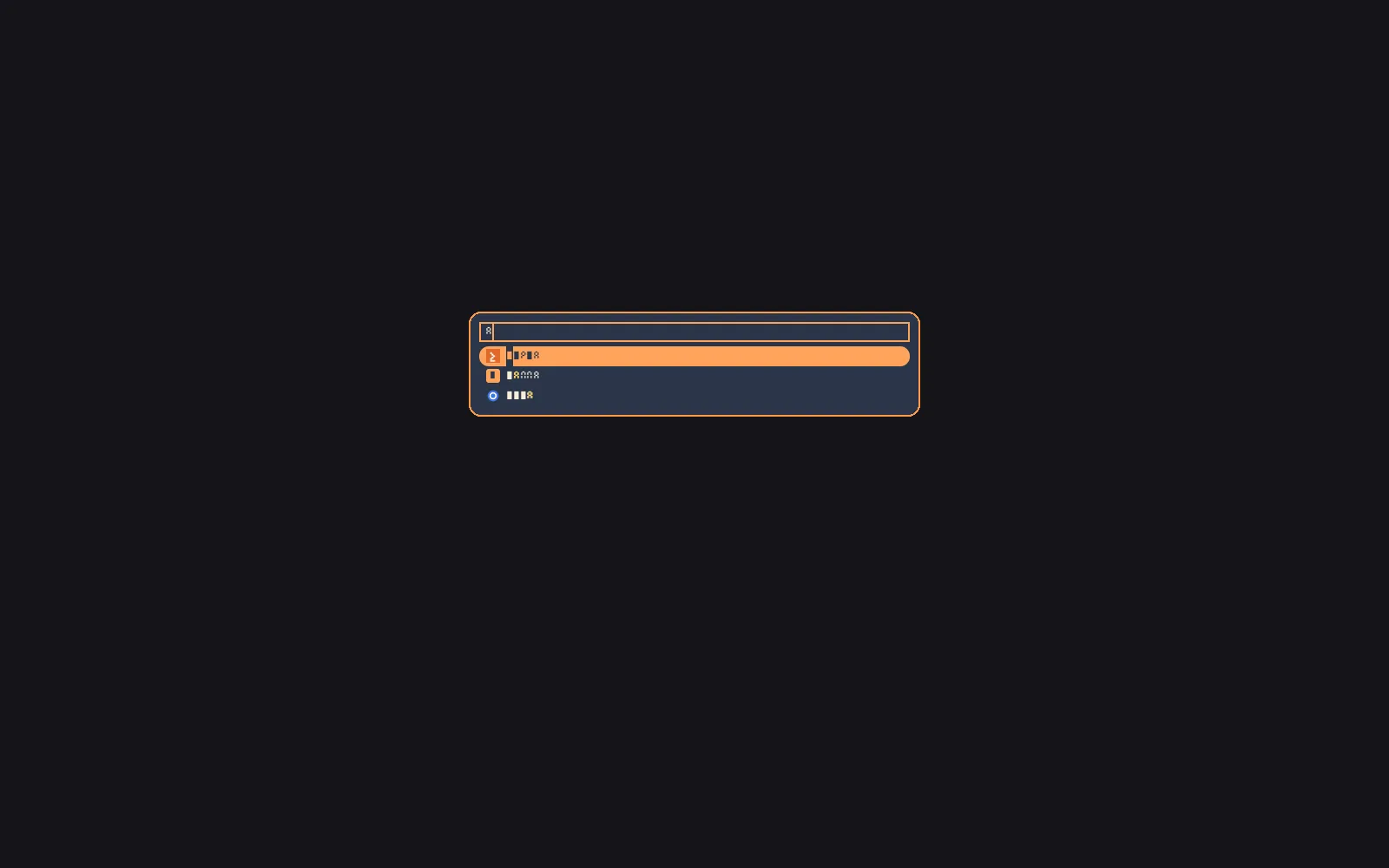
Bare scootlaunch opens the panel: an overlay surface with exclusive
keyboard, centered on the output, 40 em wide with up to 10 rows by
default. Type to filter; Enter picks. The panel holds no surface when closed —
one process per open.
scootlaunch # open the panelscootlaunch --font /path/to/font.ttf # open with an explicit typefacescootlaunch --check # validate the config file and exitprintf 'a\nb\n' | scootlaunch --dmenu --prompt='pick: ' # pick a line, print itscootlaunch --run # the panel over executables on $PATHscootlaunch --windows # the panel over open windows; Enter focuses onePicking launches the chosen entry and exits 0; dismissing exits 1.
Ctrl+Enter runs the typed text as a command. A dmenu pick prints
instead of launching (the line, or its index with --index); run
mode launches executables by basename. Flags, the stdin/stdout
contract and exit codes are in the CLI reference.
Nothing prints for an apps or run launch. The panel links
libxkbcommon. for its keyboard; a scoot desktop already carries it.
The panel draws at the output’s real device pixels, fractional scales
included (wp_fractional_scale_v1 with wp_viewporter): on a 2x output
its buffer is twice the panel’s size, so text and border are sharp
instead of a 1x image the compositor scales up. A compositor with only an
integer scale gets the panel drawn at that scale. If the scale changes
while the panel is open (the output’s scale set, or a monitor swapped), it
redraws at the new one. Sizes in this page are logical pixels.
The panel is as tall as the rows it shows: one row per match, at least
three, at most rows. Typing narrows the list and the panel shrinks;
backspacing grows it back. The search field does not move: the panel keeps
its top where a full-height panel has it, so a short panel sits a little
above the middle of the output, and the field stays under your eyes while
you type. Nothing is drawn below the panel, and a click there counts as
outside it (it dismisses, as below). A list of three or fewer matches, or
none, draws the three-row minimum; with rows set below three, the panel
never exceeds rows.
Only apps and run mode shrink. --dmenu keeps the height its --lines
asks for.
Each row shows one icon before its name. The entry shows the selected row’s icon, so the two texts stay aligned.
| Key | Type / default | Example |
|---|---|---|
Icon (desktop entry) |
theme name or absolute path, none (letter tile) | Icon=firefox |
Lookup is the Icon Theme spec: the configured theme, its Inherits
chain, hicolor, then the base directories (~/.,
$XDG_DATA_HOME/icons, each $XDG_DATA_DIRS/icons,
/usr/share/pixmaps). A name with a slash is an absolute path and is
used directly. A PNG of the right size wins when the theme ships one;
SVG rasterizes through resvg (the default-on svg feature) only
when no PNG does. Without the feature, or when nothing resolves or
decodes, or decodes to an image with nothing visible in it (fully
transparent, as some web-app entries ship), the row draws a letter
tile: the entry’s first alphanumeric, in accent with background
ink (swapped on the selected row, so the tile stays visible against
the selection fill). A tile is the same size and position as an icon.
Only the visible rows load, once per open, into a bounded cache (64 icons, 1 MiB). The keystroke path never touches the cache, so typing still allocates nothing after warm-up.
Bounds, so a hostile theme or file never panics or stalls: names are
at most 128 bytes with no slash or leading dot; paths are absolute
with no ..; files are regular, PNG at most 8 MiB (16 MiB decode
budget, 1024 px a side, 1 M pixels) and SVG at most 512 KiB with at
most 20000 nodes, rendered at most 256 device pixels a side with no
network and no system fonts; file hrefs resolve to nothing drawable
unless a valid image. A corrupt file, a huge header, a symlink loop
and a missing theme all fall back to the tile. Icons render at device
pixels: the side is about 1.2 times the font size, times the surface
scale, so a 1.5 output draws a 1.5x bitmap through the viewport.
The stripped release is 1446648 bytes without svg and 2167544 bytes
with it.
| Key | Action |
|---|---|
| typing | filters the list |
| Up / Down, Ctrl+P / Ctrl+N, Shift+Tab / Tab | move the selection |
| Page Up / Page Down, Ctrl+Home / Ctrl+End | by page, to the ends |
| Enter | launch the selection (windows mode: activate the window) |
| Ctrl+Enter | run the typed text as a command (windows mode: nothing) |
| Escape, or a click outside the panel (below a short one included) | dismiss (exit 1); with a motion set, Escape fades out first |
Left/Right, Home/End, BackSpace, Delete, Ctrl+W, Ctrl+U and Ctrl+A
edit the query. In dmenu mode Enter prints the selection (or the
typed text when nothing matches, unless --only-match says
otherwise) and Ctrl+Enter always prints the typed text. A click picks
the row; the wheel scrolls. A click outside the panel dismisses it
(exit 1, like Escape) on scoot, which closes an exclusive launcher
panel on a press anywhere else: the desktop, a window, a bar, another
output. The click then goes on to whatever is under it. A press on the
panel or on a popup it opened is inside (the shadow is not the panel); a press on
anything else is outside, including another layer-shell surface stacked
in front of the panel at that point. Pointer buttons from a mouse, a
tablet tip, scoot msg clicks and virtual pointers all count; scoot has
no touch input yet, so a touch does not dismiss. If the panel’s output is
unplugged the compositor closes the panel the same way, and it exits
instead of moving to another output. A compositor
that keeps the keyboard on an exclusive surface and has no such rule
leaves the panel open; Escape or a second invocation closes it. A
second scootlaunch while the panel is open dismisses it, so one
bind toggles. The toggle uses a socket in $XDG_RUNTIME_DIR with the
peer’s uid checked, plus a scootlaunch-<display>. file that
serialises two opens at once.
Config
Section titled “Config”$XDG_CONFIG_HOME/scoot/launch. beside the bar’s, or --config PATH. Every key is optional; a missing file is the built-in
defaults. A bad file refuses loudly. --check validates without
opening.
| Key | Type / default | Example |
|---|---|---|
font |
path, none (the look’s family, else the first well-known file) | font = "/usr/share/fonts/TTF/DejaVuSans. |
width_em |
integer 10–200, 40 |
width_em = 50 |
rows |
integer 1–64, 10; the most rows the panel shows |
rows = 8 |
Unknown keys are refused, never ignored.
The file also takes an [effects] table, which wins per key over the
look: see Effects over any look.
What a pick launches
Section titled “What a pick launches”Enter (or a click) on an entry launches it, then the panel closes:
- Token. The panel mints an activation token from the key or
button press that chose the entry, and hands it to the app as
XDG_ACTIVATION_TOKEN(plusDESKTOP_STARTUP_IDfor X clients). A running single-instance app re-activates instead of starting over. Past a 200 ms wait the launch goes without a token; a fresh window still focuses on map. - Environment. The panel strips its own token first, sets the
new one, starts the app in
Path=(else$HOME) with stdin from/dev/null, and records the pick for frecency. - Scope. Each launch gets its own systemd scope,
app-scootlaunch-<id>-<random>.underscope app., so the app outlives the panel and shows up per-app inslice systemctl --user status. The move waits at most 500 ms. - Fallback. With no session bus the app starts detached
instead (a double fork with
setsid); it stays in the compositor’s cgroup. A refused scope move keeps the running app where it started, with one warning. DBusActivatable. Entries that say so are asked overorg.first (freedesktop. Application Activate, orActivateActionfor a desktop action), with the token inplatform_data. No owner on the bus falls back toExec.
A spawn failure draws its error in the panel for 2 s in place of the rows (a click on it launches nothing) and the panel stays open; nothing is recorded. Ctrl+Enter runs the typed text split on spaces, under the same rules (its scope derives from the command’s name).
Windows
Section titled “Windows”scootlaunch --windows opens the same panel over the windows that are
open now, one row each. Type to filter, then Enter (or a click) focuses
the window and the panel closes. It is a switcher for when a bar or a
keybind does not get you there; it does nothing else to a window (no
close, minimize or move).
scootlaunch --windowsThere is no default key. Bind it in your compositor like any other
command; on scoot, in config. (then scoot msg reload):
[binds]"super+slash" = "spawn scootlaunch --windows"A second scootlaunch --windows (or a bare scootlaunch or --run)
while one is open dismisses the first, so one bind toggles.
What a row shows:
| Part | From |
|---|---|
| Name | the window’s title; the app_id when the title is empty; Untitled when both are |
| Searchable text | the title and the app_id (typing firefox finds a Firefox window whatever its page is called) |
| Icon | the desktop entry the app_id names; see below |
| Order | by title, A to Z, then by the order the compositor listed them (windows have no usage history; the list is not in focus order) |
The icon comes from the first desktop entry that matches the app_id,
in this order: a desktop id equal to app_id plus ., a
StartupWMClass equal to the app_id, then the same two ignoring
letter case. An entry that matches but has no Icon= shows the letter
tile. With no match the app_id is tried as an icon name, and a name
the theme does not have shows the tile. Entries hidden from the apps
list (NoDisplay=true) still give their windows an icon.
With a motion set, the panel fades out before the window is
activated, so focus moves up to motion-duration-ms after Enter; the
keyboard is released at the first frame of the fade.
The list is read once, when the panel opens. A title that changes while
the panel is open is not redrawn, and a window that opens meanwhile is
not added. A window that closes meanwhile stays in the list; picking it
prints that window closed before it could be activated and exits 1,
and nothing else is activated.
The mode uses wlr-foreign-toplevel-management, which scoot and sway
(and other wlroots compositors) serve. It does not use
ext-foreign-toplevel-list, whose handles cannot be activated. The
panel’s flags, config, theming and motion
apply as in the other modes; frecency does not (no history is read or
written). Exit codes: 0 after the window was activated, 1 on dismiss or a
failure.
Symptom:
the compositor does not offer zwlr_foreign_toplevel_manager_v1, which windows mode needs. The compositor does not serve the protocol, so it can neither list nor activate windows. Nothing opened. Apps, run and dmenu mode are not affected.
Symptom: the panel says
No windows. The compositor listed no toplevel windows. Layer-shell surfaces (a bar, a wallpaper) and the launcher itself are not windows.
Symptom: a window is in the list but its icon is a letter tile. Its
app_idmatches no desktop entry. Run the window’s app, then check itsapp_id(scoot msg windowson scoot,swaymsg -t get_treeon sway) against the entry’s file name or itsStartupWMClass=line.
Theming
Section titled “Theming”The panel reads <state>/look/launch. at every open: the
thirteen shell-app color roles plus font, font-size, opacity,
radius, [icons] theme and the optional depth and motion keys (see
Depth and motion), merged per key as flags, then this file,
then the look, then the built-ins. A refused key keeps its default
and is reported; a missing layer is the defaults with one warning.
| Element | Role |
|---|---|
| Panel fill | surface (default background), at opacity. |
| Input and row text | foreground |
| Placeholder | dim |
| Matched characters | match (default hover) on plain rows; on the selected row the match ink when it contrasts with the fill (at least 3:1), else the inverted chip (row-text ink behind, accent over it) |
| Selected row fill / text | selection / selection-text (defaults accent / background) |
| Panel border | focus (default accent) |
| Caret, entry focus ring | accent |
| Row icons, tile fill | accent with background ink (tile letter) |
| Corners | radius, for the panel, the selection highlight, the search field’s focus ring and the inverted match chip (at most half a row) |
| Size | font-size (the look’s popup size) |
| Spacing | derived from font-size and radius: no keys |
| Shadow, fill | shadow, fill (see Depth) |
| Entrance, fade-out, sliding selection | motion, motion-duration-ms, motion-bounce (see Motion) |
| Icon theme | [icons] theme (default Adwaita) |
The search field and the rows share one inner padding from the panel
edge. The selection fill runs the full width of that box with the
panel’s corner radius, and the icon sits inside it, never against its
edge. Every measurement (padding, row height, icon size, the gaps)
scales with font-size and radius, so a larger font or an output
scale gives the same shape bigger.
The font key names the look’s UI family and font-file the file
scoot look apply resolved it to (with fc-match, or the look’s own
[fonts. entry; the fallback its note names when the family is not
installed). The panel has no fontconfig: it draws with
--font PATH or the file font in your own launch. names, else the
font-file, read as given, else the look’s family, found by file name in
the usual font directories (the list is under
Fonts; this is the path for a
launch. written by hand or applied by an older scoot), else the
first usable well-known file. A [apps. override drops
font-file, since it names a different family. The panel draws no bold, so
it loads only the regular file. A file or family it cannot use is a warning
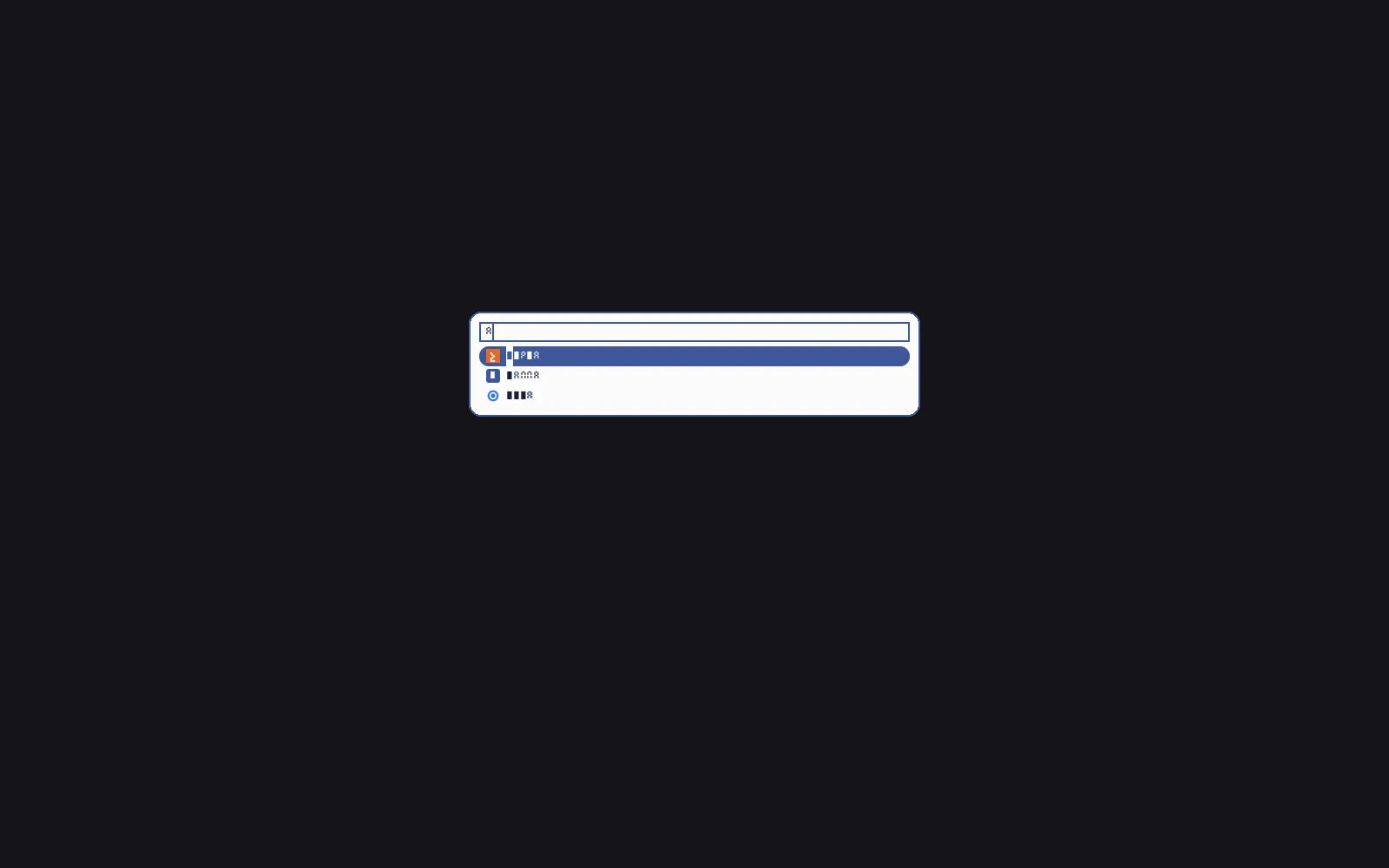
on stderr and the next choice. Rows show the entry icon with the
name beside it and its match highlighted. A light look draws the same
panel from the same roles:
Depth and motion
Section titled “Depth and motion”A look can give the panel a shadow, a gradient fill and motion. All are
off by default. Set them in look.:
[effects]shadow = "soft" # none | soft | deep | glowfill = "gradient" # solid | gradientmotion = "spring" # none | ease-out | springmotion-duration-ms = 160 # 0 to 1000motion-bounce = 0.6 # 0 to 1, spring onlyTo change one for the launcher alone, put the key in the look’s
[apps. table ("motion-duration-ms" = 220). The look
renders them as top-level keys in launch., only when it sets them. A
value outside its list or range is refused by scoot look validate; a
hand-edited launch. with one is reported on stderr and ignored, and
that key keeps its default. The keys apply to every mode. A --dmenu
panel gets the shadow, the fill and the opening, but no closing fade and no
sliding highlight: a pick or Escape prints and exits at once, so a script
that waits on scootlaunch --dmenu never waits on motion. Notification
cards read the same [effects]; see their
depth and
motion.
Effects over any look
Section titled “Effects over any look”To turn a shadow or a spring on for every look, set it in launch.
instead of copying a look. The [effects] table wins per key over the
active look:
[effects]shadow = "soft"motion = "spring"motion-duration-ms = 160| Key | Value |
|---|---|
shadow |
none, soft, deep or glow |
fill |
solid or gradient |
motion |
none, ease-out or spring |
motion-duration-ms |
whole number, 0 to 1000 |
motion-bounce |
number, 0 to 1 |
All keys are optional and unset by default, and mean what they do in the
look. A key the file does not set stays the look’s. Any other key in
[effects] (font-size, a color), and a [card] or [title] table (the
notifier’s), refuses the file like any other typo.
A value outside its list or range does not refuse the open: the panel
warns on stderr, launch., and that key
keeps the look’s value. --check prints the same warning and exits 0. The
panel reads the file at every open, so an edit shows on the next one.
With the Nix profile, programs.
writes this table (see
Look and theme).
Symptom:
--checksaysconfig refused: [effects] has no key.[effects]takes onlyshadow,fill,motion,motion-duration-msandmotion-bounce.
shadow |
What it draws | Room around the panel |
|---|---|---|
none |
Nothing. The default. | none |
soft |
A low shadow: 4 px down, 12 px blur, 36% black. | 12 px at the sides, 16 px above and below |
deep |
A heavy shadow: 10 px down, 28 px blur, 55% black. | 28 px at the sides, 38 px above and below |
glow |
A 16 px halo, centered, in the focus color, at 51%. |
16 px on every side |
fill |
What it draws |
|---|---|
solid |
The surface color, flat. The default. |
gradient |
Light at the top. On a dark surface the top edge is lightened about 10% toward white and fades to surface at the bottom; on a light one the bottom is darkened about 8%. The panel keeps the look’s opacity.. |
The shadow needs room, so the panel’s surface is that much larger on
every side, equal on both sides of an axis: the panel stays centered
exactly where it is without a shadow. The room is the larger of the
two sides, even where the shadow reaches further one way (a soft shadow
needs 8 px above and 16 px below, so the room above is 8 px more than it
needs). The
shadow falls outside the panel only: a translucent panel does not show its
own shadow through its body. The room is not part of the panel for the
pointer: a click on the shadow is a click outside the panel, so it
dismisses it and goes on to what is under it.
On an output too small for the room, the shadow shrinks to what fits; the panel never moves.
soft and deep are black, so they show over light and mid-tone
backgrounds and nearly vanish over a near-black wallpaper; glow reads on
any background.
Motion
Section titled “Motion”| Key | Value | Default | What it does |
|---|---|---|---|
motion |
none, ease-out or spring |
none |
The curve every move follows. none moves nothing and costs nothing. |
motion-duration-ms |
whole number, 0 to 1000 | 160 |
How long one move takes. 0 is the same as none. |
motion-bounce |
number, 0 to 1 | 1 |
How far a spring overshoots: 0 is ease-out, 1 is the compositor’s own spring. Ignored by ease-out. |
With a motion set, the panel moves three ways:
- Opening. The panel grows from 96% of its size and fades in. Keys and clicks work from the first frame, before it has finished.
- Closing. Escape, a second
scootlaunchand a launch fade the panel out (to 97% of its size) before the process exits. The keyboard is released and clicks pass through at the first frame of the fade, so the window you go back to takes keys at once, and a launch runs before the fade starts, not after. A second invocation during the fade opens a new panel. The exit comes after the fade: up tomotion-duration-mslater (plus at most 100 ms if the compositor stops sending frames), so a script that waits onscootlaunchwaits that long. A click outside is different: the compositor asks the panel to close and ignores anything it does after that, so it exits at once with no fade.--dmenunever fades out: it exits as soon as it has printed or been dismissed. - Selection. The highlight slides to the new row when the selection moves, and carries on from where it is when it moves again before it lands. Typing, which reorders the rows, snaps it. The row text takes the selected color once the highlight is over more than half of that row, so it stays readable on the way.
The panel moves on the compositor’s frame callbacks: no timer runs, and once it has come to rest it asks the compositor for nothing, so an open panel costs nothing while you read it. A click lands on the row where the panel will be, not where it is drawn while it grows.
There is no reduced-motion setting to follow: scoot has none yet. To turn
the panel’s motion off, set motion = "none" in the look or in
[apps., then scoot look apply; the next open reads it.
ginger-night, the default look, sets a soft shadow and no motion.
radial-burst sets a glow, a spring and a 220 ms run.
Symptom: a look sets
shadowand the panel has none. The panel warns on stderr,shadow is not a shadow stylefor a value outsidenone,soft,deepandglow. Check<state>/look/launch.for atoml shadowline.
Symptom: a click next to the panel closes it. The shadow is part of the surface but not of the panel: a click on it dismisses, like a click anywhere else outside. With
shadow = "none"there is no such margin.
Symptom: the panel takes a moment to go away after Escape. That is the fade,
motion-duration-mslong. Shorten it or setmotion = "none".
Symptom: a look sets
motionand the panel still appears at once. The panel warns on stderr,motion is not a motionfor a value outsidenone,ease-outandspring. Check thatmotion-duration-msis not0and<state>/look/launch.has atoml motionline.
Troubleshooting
Section titled “Troubleshooting”Symptom: the panel opens on the wrong monitor.
The panel names no output, and an output-less layer surface lands on the output under the pointer (falling back to the primary when the pointer is over no output) — the same rule new windows use. If the panel still opens away from where you are looking, move the pointer onto that monitor first: the compositor picks the output once, when the surface maps, and does not move it afterwards.
Symptom: the panel refuses to start over a font.
Give it a file with --font PATH (a . or ., such as
DejaVuSans.ttf). Without one it tries the configured font, then the
look’s font-file, its family, then well-known paths, refusing with
what it tried.
Symptom: the panel ignores the look.
The panel warns once per fallback on stderr: a dangling or missing
link means no look layer, and a refused key names itself. scoot look apply re-renders the layer; the next open reads it.
Symptom: rows show letters instead of icons.
Letters are the fallback: no svg feature (SVG-only names), no icon
theme, or nothing resolved or decoded. With the feature, an SVG-only
entry still needs its theme installed. Check Icon= with
scootlaunch --list --json, and the theme in
<state>/look/launch. under [icons].
Symptom: an app starts outside its scope.
systemctl --user status 'app-scootlaunch-*' shows which scope an
app landed in. No scope at all means the move was refused or timed
out (500 ms): the app keeps running in the launcher’s cgroup, and
the run says why on stderr. A bus with no user manager behind it
answers ServiceUnknown the same way; with no bus at all the app
starts detached instead and stays in the
compositor’s cgroup.