
Sound, brightness keys and the on-screen display
Press a volume key and a bar shows the level; press a brightness key and a bar shows that instead. Both come on with the profile: PipeWire with WirePlumber running underneath, the keymap’s volume, brightness and mic-mute binds routed through small scripts that step the control and poke the on-screen display, and a sink helper the Bluetooth picker calls.
programs.scoot.desktop = { enable = true; # No sound or OSD on this box (the binds run silent, as before): # audio.enable = false; # A longer on-screen hold (default 1.5 s): # audio.osd.timeoutMs = 2500;};What each press does: volume steps the default sink 5% (wpctl,
fractions and percents both parsed, so 1. shows as 105), mute
toggles it, mic-mute toggles the default source, brightness steps
every backlight device the same relative amount, and the bar shows
the rounded average. Past 100% (a 5%+ past full) the bar clamps into
an urgent fill. Muted is the same bar washed out. Media keys stay
silent, since play state already shows in the bar’s media module.
Keyboard backlight LEDs are stepped by nothing (class leds, reserved
and unbound; see the keymap below).
The OSD draws on the overlay layer with the look’s colors
(background and text, accent fill, active-ring border, dim while
muted, urgent past full), above fullscreen windows, so a fullscreen
game never swallows the volume bar (music-desk paper and blue over a
fullscreen terminal):
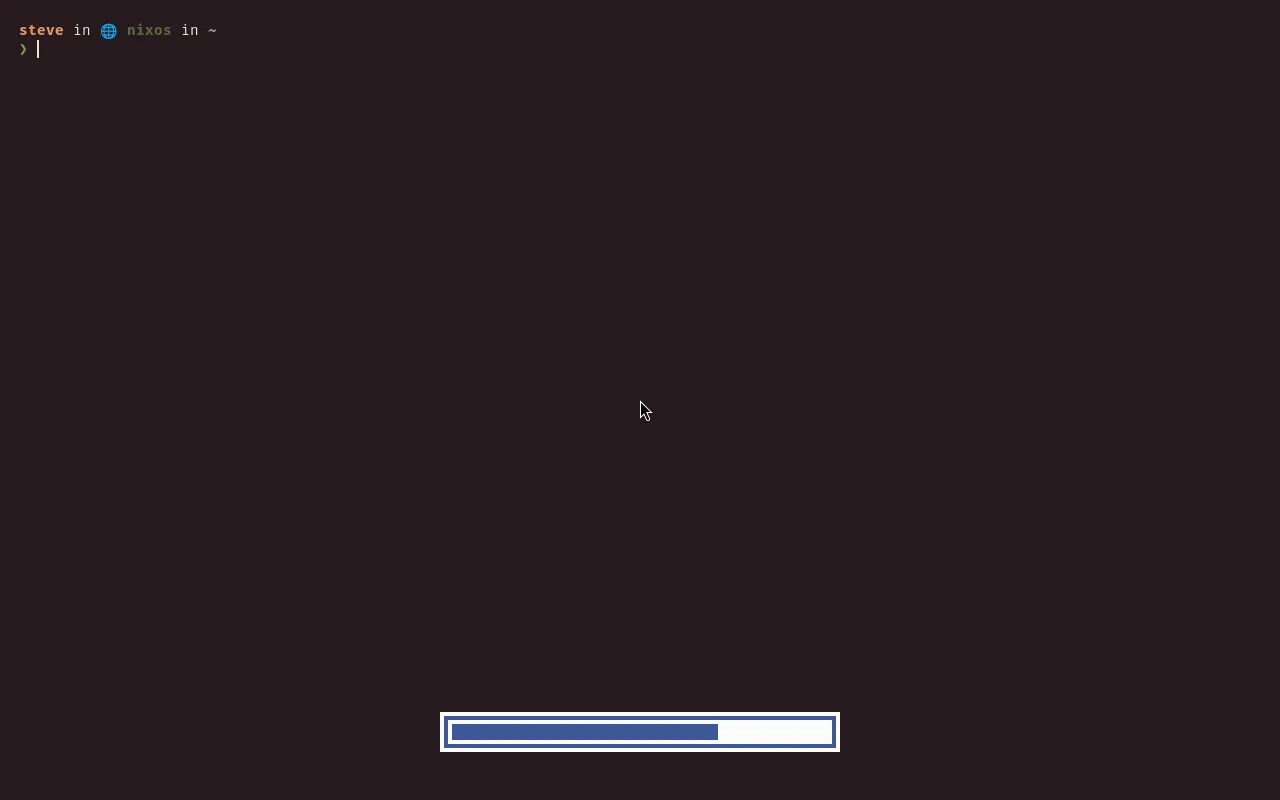
It holds nothing when hidden: the daemon blocks until the next key
press, keeps no surface, and wakes nothing (measured below). The
bar’s volume, brightness, media and microphone modules stay
the persistent display; the OSD is the transient one.
PipeWire runs with WirePlumber because wpctl is WirePlumber’s own
CLI, and without a session manager there is no default-device memory.
WirePlumber adds ~4.7 MiB (NAR bytes new over pipewire itself,
measured at the pinned rev, aarch64-linux). The slot has no effects
and no per-app routing UI.
Measured at the pinned rev (8ce4ef6, aarch64-linux, on the M2): full
closures by nix path-info --closure-size, marginals as new store paths
over the profile’s own tools, idle RSS as VmRSS, wakeups as
context-switch deltas over 62 s hidden:
| Tool | Version | Full closure | New over profile | Idle RSS | Wakeups hidden | Why / why not |
|---|---|---|---|---|---|---|
| wob | 0.16 | 57.5 MiB | 225 KiB (2 paths: itself plus inih) | ~2.2 MB | 2 in 62 s | the pick: no toolkit (wayland, inih, seccomp), overlay in its own source, hides itself after the timeout, per-output sections, one value [style] line per press |
| swayosd | 0.3.1 | 1.06 GiB | 228 MiB (49 paths) | never runs here | — | a GTK4 stack (gtk4, layer-shell, pulse, ffmpeg, cups, avahi…) at ~19× the closure and ~1000× the marginal, and it replaces wpctl/brightnessctl/playerctl with its own backends instead of composing with them |
| a scootbar popup | — | 0 | 0 | 0 | — | rejected on complexity, not size: a key-driven transient OSD is a new surface role plus IPC plus an auto-dismiss timer in the bar’s Rust, and it forces the bar on for the OSD (the profile lets you turn the bar off); three wrapper scripts and no new protocol instead |
Every value is an option, applied on rebuild/switch (the unit restarts into the new config; no re-login):
| Option | Type | Default | Meaning |
|---|---|---|---|
desktop. |
bool | true with the profile |
PipeWire with WirePlumber running, the OSD unit and scripts, the binds routed through them |
desktop. |
enum ("wob") |
"wob" |
the program behind the OSD (a future scoot OSD widens this without renaming anything) |
desktop. |
int (ms, at least 0) | 1500 |
how long the OSD stays mapped after the last step |
desktop. / . |
package or null | wob / pipewire (Linux-only: null off Linux) | point at your own builds; null with the switch on fails evaluation naming it |
desktop. |
bool | true |
theme the OSD from the look; false keeps wob’s own black-and-white (mute stays readable through a fixed gray style) |
Switching sinks (speakers, headphones, a Bluetooth headset) from a terminal or a script (the Bluetooth picker’s Audio output… row runs the same helper; see WiFi and Bluetooth):
scoot-audio-sink list # id plus name, one per linescoot-audio-sink set 43 # by id, or by exact namescoot-audio-sink cycle # next after the current default, wrappingset and cycle move the default and show its level on the OSD.
One sink cycles onto itself with a message.
Apple Silicon speakers keep their own tuning: the M2’s hand-wired
speakers-heal unit stays yours to fold in (a user unit ordering after
PipeWire). The profile runs the sound server and does not voice your
hardware.
With no audio hardware at all (a headless box, a VM with no sound
card) every bind fails per entry with the script’s own message on
stderr and exit 1 (scoot-audio-sink list says no sinks, a volume step
says no device), and the session carries on. A null tool beside audio. fails at
evaluation instead, naming the option.
Troubleshooting, by symptom:
- A volume or brightness key does nothing. Check the control first,
not the bind:
wpctl get-volume @DEFAULT_AUDIO_SINK@,brightnessctl -c backlight -m -l. Then the daemon:systemctl --user status scoot-osd; a dead unit means the fifo is missing and every step says “no OSD running”. Then check the bind reached the file ([binds]in~/.).config/scoot/config. toml - The step lands but no bar shows. The OSD missed the fifo: same unit check as above. The step warns (“the step landed, the OSD did not show”) and exits 0; the control is fine, the display missed.
- The bar never hides. Something keeps feeding the fifo, or the
timeout is huge. Read
~/.(the generated file); the first content lines are the timeout.config/wob/wob. ini scoot-audio-sink listis empty. No sinks: PipeWire runs with nothing behind it (a VM, or Bluetooth mid-reconnect).cyclewith one sink stays put and says so.- Two bars stack. A second OSD runs beside this one (another wob,
or swayosd): turn this one off (
audio.) or uninstall the other.enable = false - The bar shows the wrong screen’s brightness. It shows the average across backlight devices, one bar for the whole desk.